Tip
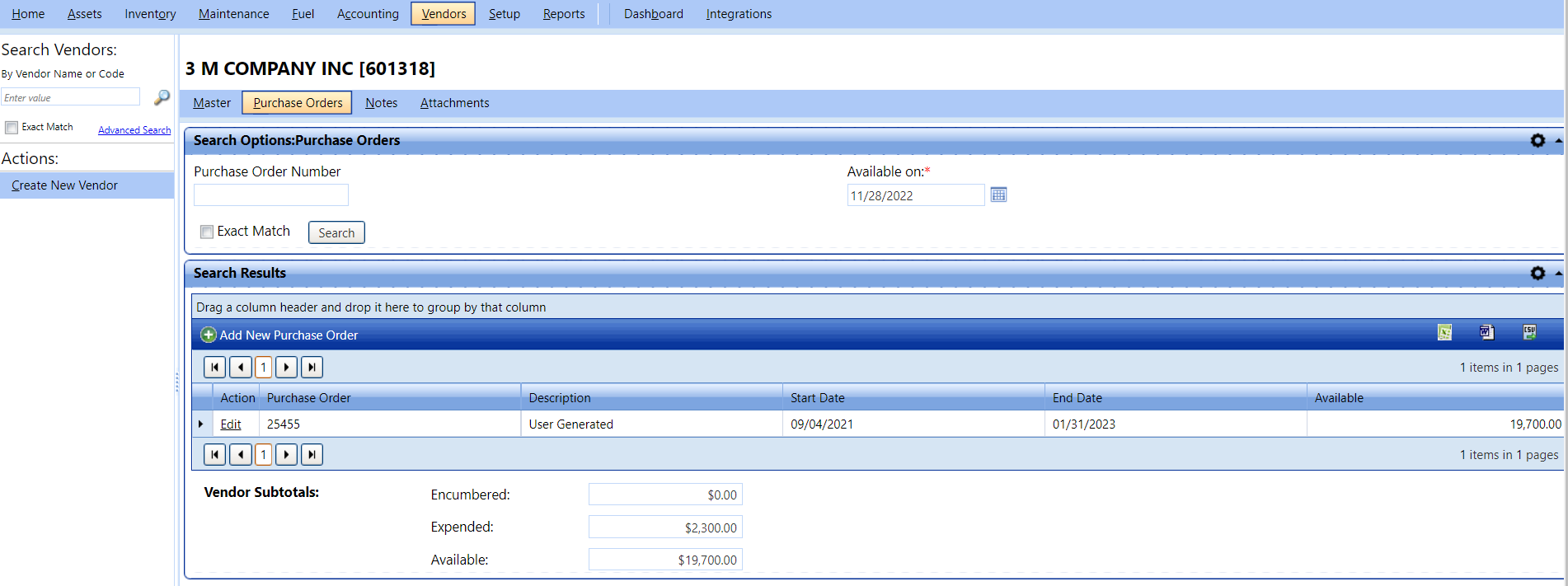
TipBased on the purchase order details of the selected vendor, type the values in the Encumbered box and Expended box. The value in the Available box is auto-calculated. For more details, see Purchase Orders Tab.
Tip
To view the Purchase Orders section, click the Purchase Orders link.
Purchase Order Field Descriptions
|
Term |
Definitions |
|
Funded Amount |
Budget amount for the purchase order. |
|
Max Purchase Limit |
Maximum limit of the amount to spend on purchase orders. |
|
Encumbered |
The amount held for the items that are ordered but not yet received, this amount can be reduced based on the order pricing when the items are received. |
|
Expended |
The amount spent on received items. |
|
Available |
Funded Amount (Encumbered + Expended) |
|
Start Date
|
Effective start date for the PO. Default to first day of current fiscal year. Fiscal year start and end dates are stored as Business Unit Setting MM/DD. |
|
End Date
|
Effective end date for the PO. Defaults to the first day of the next fiscal year. Fiscal year start and end dates are stored as Business Unit Setting MM/DD. |
Note: Purchase Orders are associated with specific vendors.